Using Insights
The Insights tab in Emma allows you to track the performance of your overall email marketing. Here, you can view metrics for the combined totals of the mailings you’ve delivered over a given date range.
For additional details, you can also review the Email Marketing Help topic Understanding Your Account Insights.
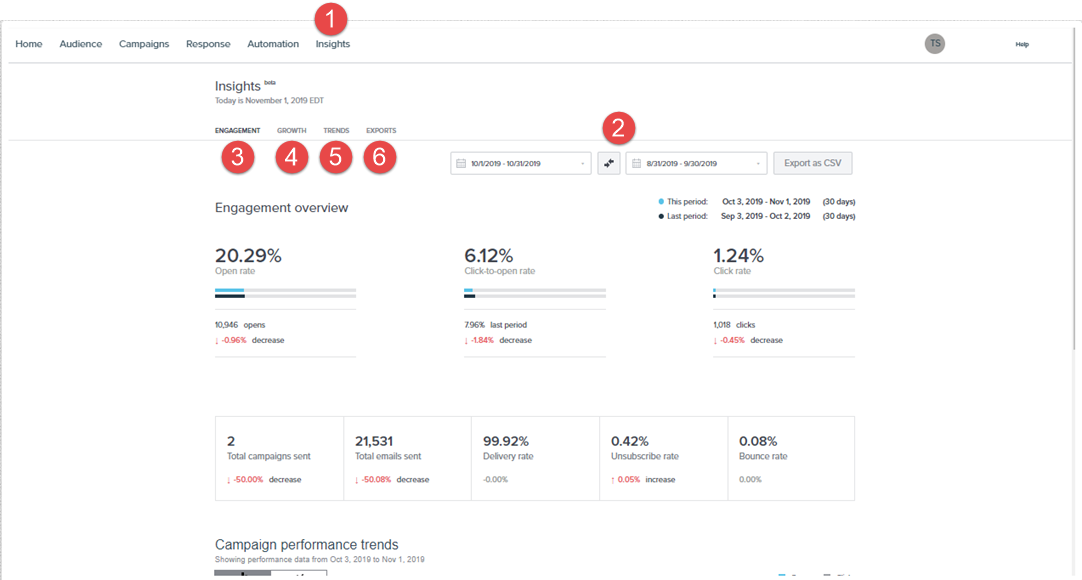
- Select Insights.
- Select a date range you wish to analyze.
- In the Engagement tab, you can monitor the Open Rate, Unique Clicks, Delivery %, Opt-outs, and Shares of the total campaigns sent.
- In the Growth tab, you can monitor the audience member growth over time.
- In the Trends Tab, you can analyze data describing your optimal time to send campaigns, and best-performing content.
- In the Exports Tab, you can track the status and history of any files you’ve exported from Emma.