Selecting the Techsphere Work Activity
Clock actions will not register in Meevo unless there is an associated Work Activity. You can select this Work Activity in Meevo > Integration > Techsphere. Each time a student or employee clocks in using the scanner, Meevo will associate a Work Activity to that clock action.
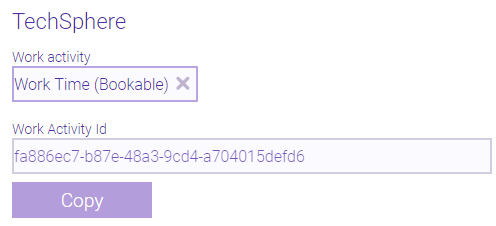
- This list displays Work Activities you created in Meevo. There are no default or system activities.
- You can assign only one Work Activity to the Techsphere scanner at a time.
- Note the Work Activity Id, which is not editable and is used by Techsphere during the setup process.
- To change the Work Activity, select a new on this screen. Make sure you also update the Work Activity in Techsphere's setup applications. You must do both to successfully change the Work Activity. If you are unsure of how to do this, contact Techsphere for guidance.