Viewing the Wisely Log
The Wisely Log tab is where you can view the status of all send attempts for a specific day. If there was an issue with the sync, this tab will provide Error Codes you can use when troubleshooting.
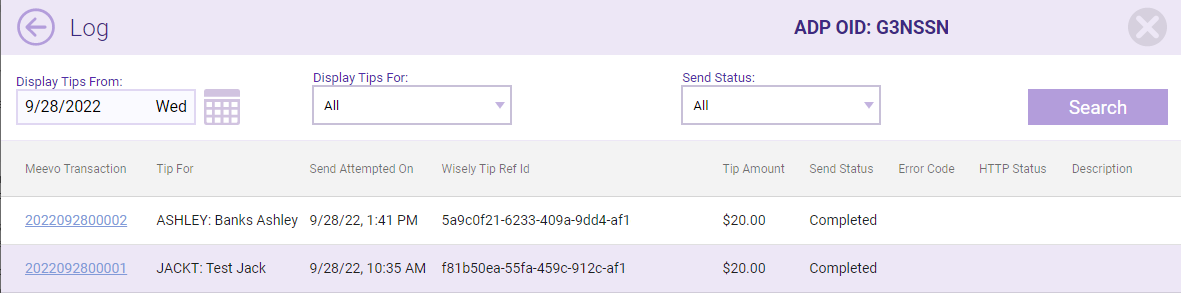
Filters
- Display Tips From: The date selector defaults to today, but you can choose any day and select Search to view the syncs for that day.
- Display Tips For: View tips for all employees or select a specific employee. Only mapped employees appear in this drop-down.
- Send Status: Filter by the possible statuses that can appear in the Send Status column. See below for more details on send status.
Search results
Select a column header to sort by that column.
- Meevo Transaction: This is the corresponding transaction in Meevo where the tip was applied to an employee. You can select this number to jump to this transaction in Transaction Editor.
- Tip For: The employee designated to receive the tip.
- Send Attempted On: The date and time the last sync was attempted.
- Wisely Tip Ref ID: This is the ID assigned to this transaction by Wisely.
- Tip Amount: The amount allocated to the employee in this row.
- Send Status: Displays the sync status for that employee:
- Success: Tip data was successfully sent to Wisely.
- Pending: The Pending status indicates that this tip is queued up for sync. Pending transactions can still be edited in Meevo, as they have not yet synced to Wisely. If a tip still had a Pending status the next day, select Check Status to get the latest status of the sync. Often times, this will update the status to Completed.
- Error: If there is an error, you'll get an Error Code, HTTP Status, and Description of the error. Meevo attempts to re-sync error transactions every hour for the rest of the day. If the transactions does not sync by end of day, you'll need to log into Wisely and manually make the change, as the error transaction will not be attempted again.
| Error Code | HTTP Status | Description |
| 01 | 500 | Service Down |
| 01 | 400 | Card load is already in process. |
| 99 | 400 | Unable to process request at this time |
| 10440 | 400 | Employee ID is invalid |
| 10832 | 400 | Funding account at the specified location could not be found |
| failed-argument | 400 | Transfer Type Code must be immediate |
| failed-binding | 400 | Missing request header 'orgOid' for method parameter of type string |
Notes on "Card load is already in process"
This 400-01 status indicates the tip has been sent to Wisely more than once, usually due a communication issue between services. Wisely sends this status back to Meevo to prevent double-funding. This status is an indication that you should log into Wisely and check to see if the tip was sent over. If not, you will need to manually make this tip update in Wisely.