-
2025 March Draft Release Notes
Coming Soon: A New eGift Experience!
Meevo’s client-facing eGift solution is getting a major upgrade! The new eGift design makes it easier than ever for clients to purchase gift cards and packages, enhancing their experience while helping you drive more eGift sales.
Note on Availability: Details on when this will be available for you will be provided shortly after the March release!
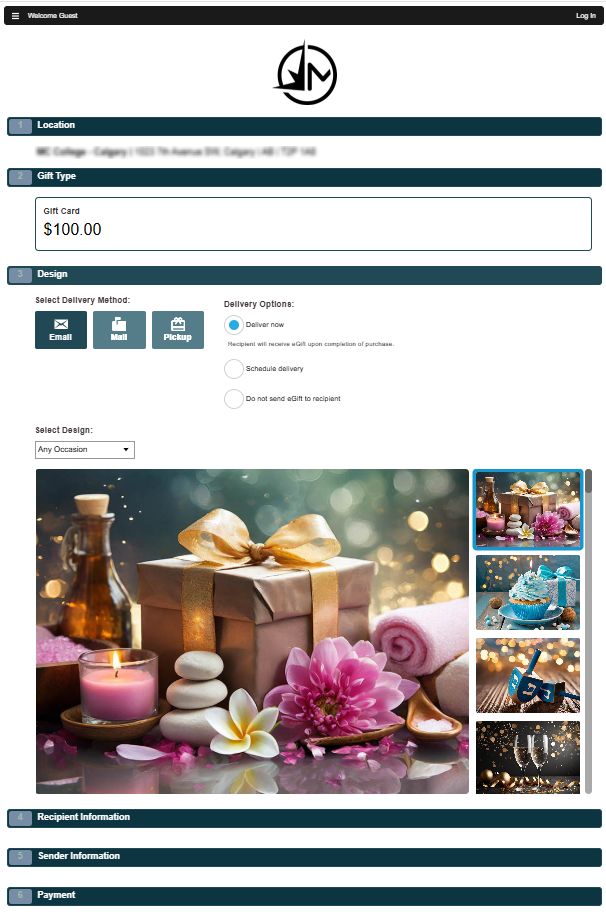
Highlights of the new eGift experience
- The new eGift experience shares the same modern design and step-based workflow as our other client-facing sites (Online Booking and Online Membership Sales), providing a familiar experience for clients and making it easy for them to navigate and complete their purchases.
- All existing eGift settings will carry over to the new eGift experience, including Custom Branding. There are no additional (required) steps a business needs to take in regards to options or branding!
- As with our other client-facing sites, the new eGift experience can easily be embedded within your business website.
- Also included with the new eGift is a brand new suite of beautiful, professional-looking templates for clients to choose from when selecting a card design.
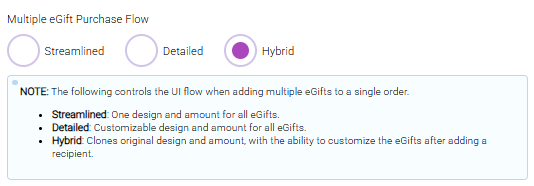
- New options allow your business to simplify the workflow when a client adds multiple eGifts to a single order. Businesses can select Streamlined (the simplest workflow), Detailed (the workflow with the most customization), or Hybrid (give the client the ability to customize as much or as little as they'd like). This bullet = Internal Only
Updated Custom Branding functionality
Note: This new version of Custom Branding is only available to businesses who are using the new eGift experience.
This simplified version of Custom Branding offers a more clear and easy-to-understand interface, a new publishing process, and a preview window!
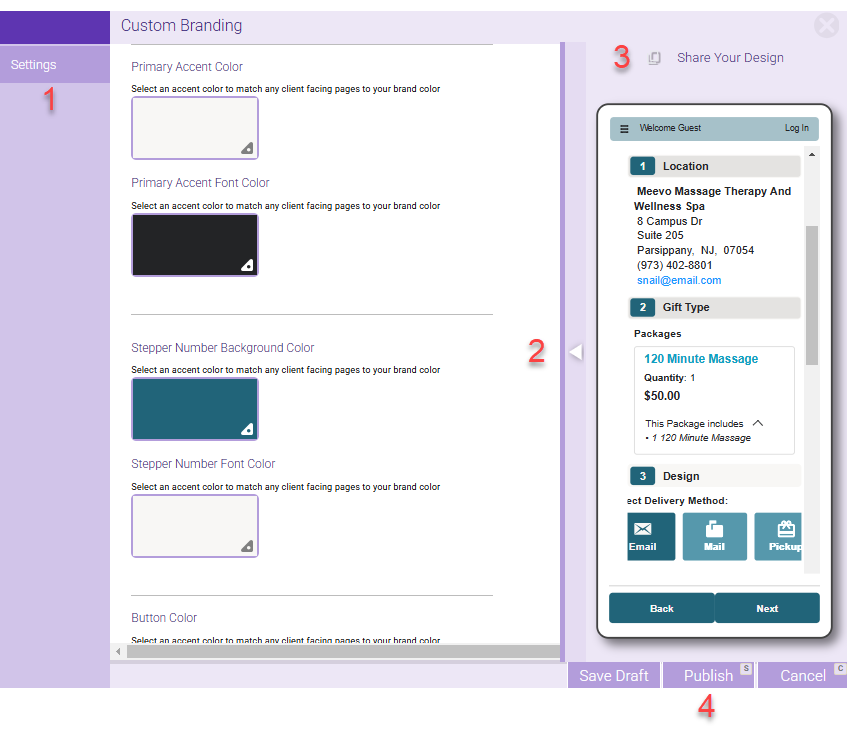
- We simplified the Custom Branding setup workflow by condensing all branding settings into one Settings tab...no more toggling between Cover Design and Page Design tabs!
- The draft preview window on the right displays your Custom Branding changes in real time, allowing you to preview your changes prior to publishing!
- Before publishing your changes, you can send decision-makers a working preview site of your branding changes via the URL under Share Your Design (above the Preview window).
- When you're satisfied with your styles, click Publish to update your client-facing site(s).
Additional Validation for Card on File Transactions
Our analysis of MeevoPay chargeback data revealed that many disputes stemmed from card-on-file transactions. Since regulations prevent processors from storing the Card Verification Value (CVV), businesses often struggled to win these disputes due to the lack of CVV verification at the time of purchase.
As a result, we've made a couple of important changes that can provide additional security and validation to card-on-file transactions:
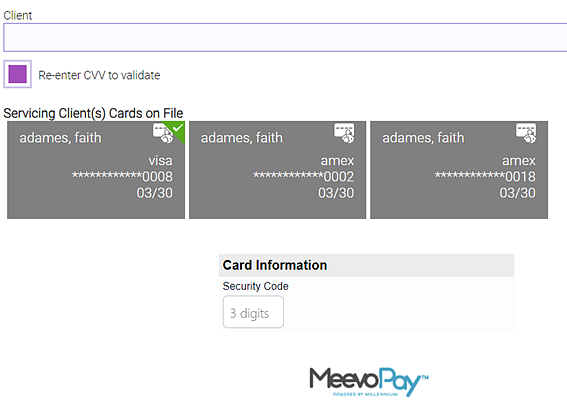
- Clients are now required to re-enter their CVV when paying online: Clients using a card on file to make a payment in Online Booking, Self-Pay, and the new eGift experience must now re-enter their CVV to complete the transaction.
- Front Desk Employees have the option to require the CVV when using a card on file during checkout in Meevo: A new checkbox Re-enter CVV to validate is now available within the Register's Cards on File area. This will reveal a new Security Code field below the list of cards, which must be filled out to complete the transaction. We’ve made CVV re-entry optional in the Register, giving Front Desk Employees the flexibility to decide whether or not to request it for card on file transactions.
New Design for the Meevo Login Screen
We've refreshed our Meevo logins screen to match our new branding color palette.
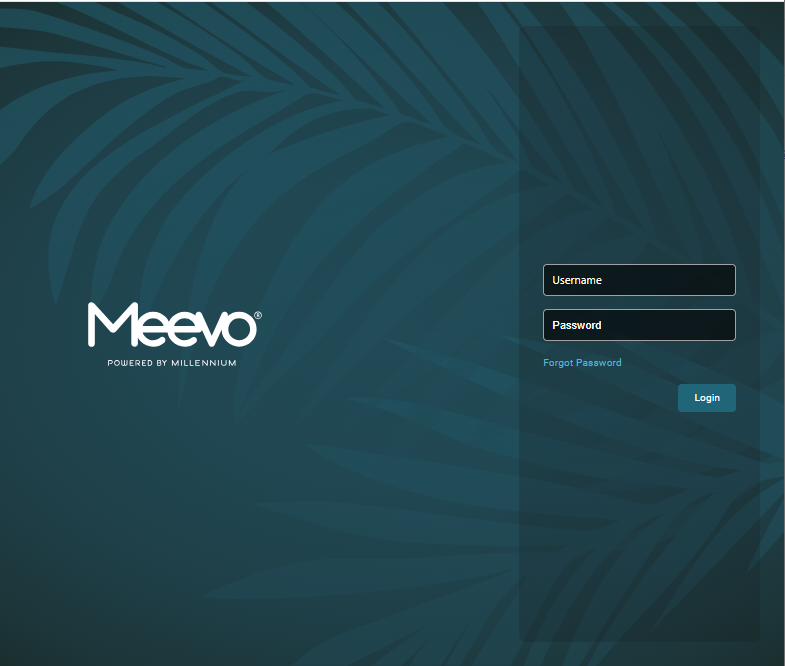
The Meevo browser tab icon has also been updated to match the new design, so be sure to look for this updated icon when navigating your browser tabs.

Improvements to Meevo's Client-Facing Sites
These enhancements apply to the Meevo client-facing sites such as Online Booking (OB), the new eGift experience, and Online Membership Sales (OMS).
Updated step-numbering for single-locations
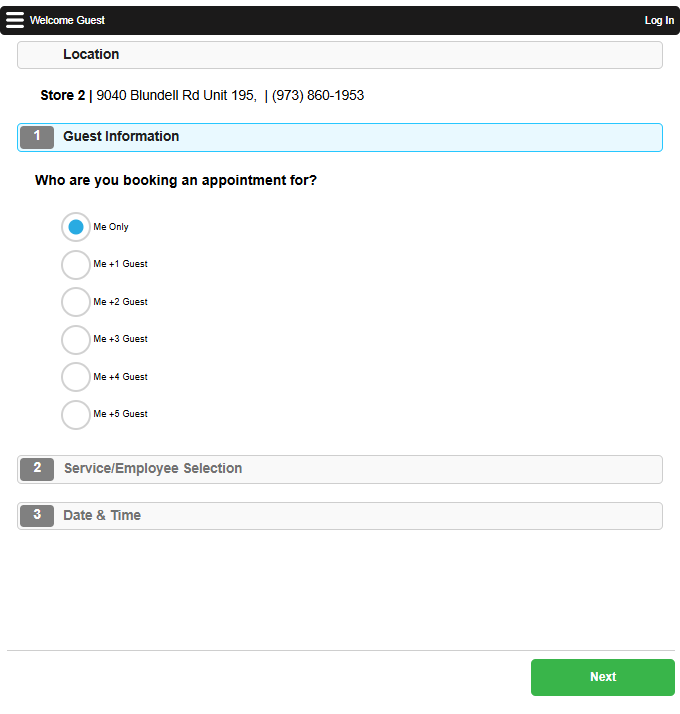
To avoid confusion about the workflow, we adjusted the numbered steps on a single location's Online Booking, eGift (new experience), and Online Membership Sales sites. Step 1 is no longer the Location Selection step, since this is not necessary for single locations. Clients now begin on the Guest Information step, and location information will be displayed without a step number for single locations.
Site-specific Terms & Conditions
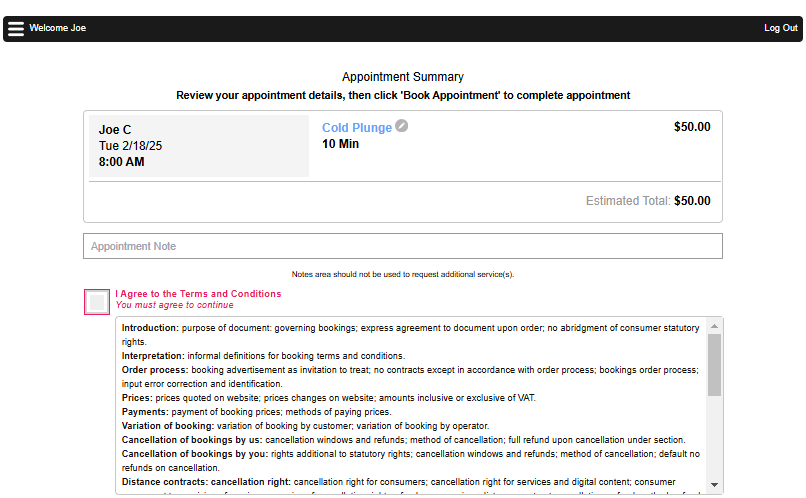
With this enhancement, you'll be able to craft individualized Terms & Conditions that are specific to each site (Online Booking, eGift New Experience, and Online Membership Sales).
- Each client-facing site can now offer its own Terms & Conditions, configurable from their respective "Settings" page in Meevo.
- Clients no longer agree to Terms & Conditions from the Client Registration form, making it easier for them to continue booking or make a purchase. Instead, clients will be presented with site-specific Terms & Conditions prior to finalizing a transaction (that is, prior to finalizing an appointment in Online Booking or making a purchase in eGift or Online Membership Sales).
Visual improvements to the Client Registration form
We've also refined the Client Registration Form for consistency and readability:
- Required fields are longer highlighted in red until submission, but they will still display a red dot as an indicator.
- The font and red shade for hint text and data fields are now uniform.
Clickable business "Email" in hamburger menu
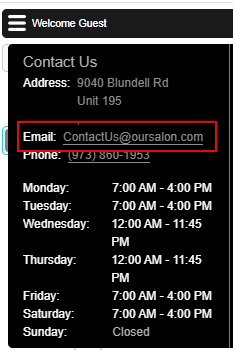
The business email address is now a clickable link within the hamburger menu of all client-facing sites. Clicking the email will open the device’s default email app, automatically inserting the business email in the "To:" field. Previously, only eGift offered a clickable business email while the other sites displayed plain text.
"Password Reset" email adjusted for clarity
The password reset email notification has been reworded to no longer reference specific apps so that it applies to all platforms. The message clearly guides clients through the reset process while maintaining consistency across different client-facing sites.
Improved navigation in the "Forgot Password" flow
We've also enhanced the Forgot Password workflow so that after resetting their password, users will be returned to the correct client-facing site for a seamless experience.
Improved prompt when deleting a card on file
In Online Booking, we adjusted the style of the prompt that appears to clients when they are attempting to delete a card on file.
Enhancement to Notification Deliveries
This enhancement helps ensure that critical updates, such as Arrivals, Docs and Forms, appointment confirmations, and reminders, reach your clients without interruption.
- Sometimes, a client may opt into text message notifications after their appointment notifications were already scheduled. Previously, these notifications wouldn’t be sent after the client opted-in.
- Now, if a client was in a "Requested" state for text opt-in when text notifications were scheduled to go out, Meevo will automatically retry sending the text notifications once the client opts in—provided the appointment is still valid.
Online Presence Management Updates
Fewer Online Presence Management tiles for easier navigation
Online Presence Management recently underwent a UI refresh, giving it a new modernized interface. As a result, we condensed the Online Presence Management (OPM) tiles in the Meevo menu to two tiles for cleaner, more user-friendly navigation.
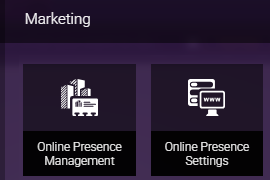
- The new Online Presence Management tile is your launchpad to OPM. The tile opens directly to the Review Response page, but you can now easily navigate to Analytics, Reputation Management, Social Posting, etc. all within the same screen.
- The Online Presence Settings tile will continue to bring you to Meevo's Online Presence Settings page.
- The new interface comes with an improved left navigation sidebar, making it even easier to get around in OPM.
Enhancements to Review Analytics
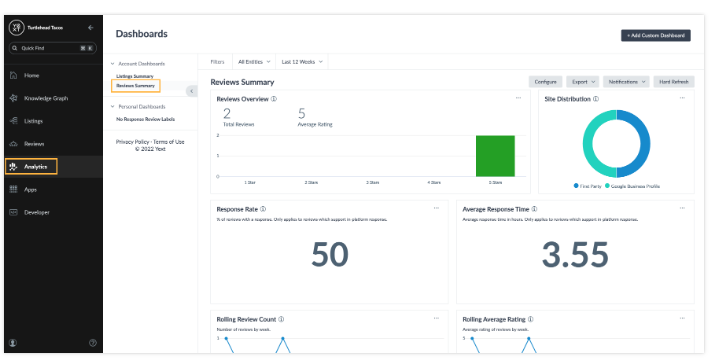
Businesses that receive a high volume of customer reviews often struggle to discern common themes and extract meaningful, actionable insights. With the new Reviews Insights screen, you can quickly see performance metrics that matter and understand where you can add the most value to the business and improve your star rating. Users can filter the insights screen by publisher, date, and entities.

The new screen has three parts:
- An overview of key metrics shows you the most important metrics about your reviews and how they’ve changed over time. These include average rating, reviews volume, response time, and response rate. You can also view these metrics dimensioned by theme.
- Review Themes show how your brand is performing in specific aspects of your business that you can choose to track, such as customer service, product quality, pricing, and wait times. A review label will automatically be created for each new theme.
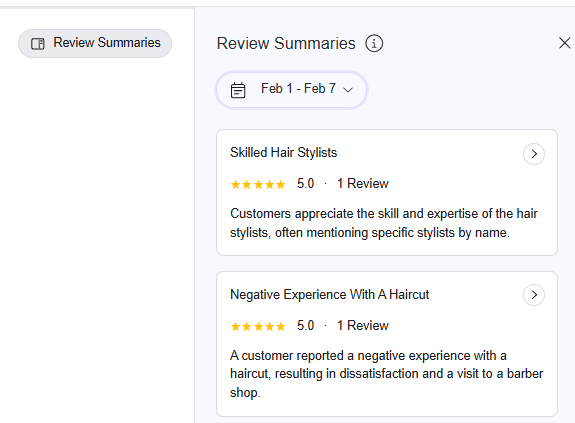
- Review Summaries are now available within Review Insights! These summaries are produced weekly or monthly (depending on your business’s review volume) to extract key insights from recent reviews, recommend which themes to look into, or suggest new themes to track.
Updates Coming Soon to Meevo Apps
MeGo (Meevo's Client-Focused App)
When creating or editing a client profile through MeGo, users will now be able to toggle the Client does not wish for their personal information to be sold or shared option through the app. Previously, this option was not available when creating or editing a profile through the app.
MyMeevo (Meevo's Employee-Focused App)
We’ve made it easier for employees to log into the MyMeevo app by updating how IP Restrictions work with MyMeevo. Previously, employees needed both a whitelisted IP and an offsite role to log in. Now, as long as an employee is logging in from a whitelisted IP and has a valid Security Role, they can access the app without the extra restriction.
MeevoBI (Meevo's Business Intelligence App)
The MeevoBI app has undergone significant changes "under the hood" to ensure that the app remains compatible with your device and operating system.
Important: If you purchased MeevoBI, you’ll need to reinstall the app to continue receiving updates. Simply uninstall the current version from your device, then visit your device’s app store to download and install the latest version. The old version of MeevoBI will no longer receive updates, so this step is necessary to keep your app up to date.
New Reports
COMA201B: Sales Analysis by Location
The COMA201B is an Interactive Report version of the COMA201, providing the same data and level of detail but with the added benefit of Interactive Report functionality. Businesses with multi-location service providers will really enjoy this update, as they can group data by employee to see performance across all locations in one convenient place.

Report Enhancements
COMA201: Sales Analysis by Location
The COMA201's data was adjusted so that it is consistent with similar metrics in the MA201, MA200, and COMA201B reports.
MA201: KPI's by Month
The MA201 is now available in Report Scheduler as a scheduled report. Managers can automatically send employees the MA201 at the end of each month so that they can keep track of their performance YTD.
Other updates
We increased the font sizes in Report Manager to make the report descriptions easier to read.
Public API and Daily Data Stream (DDS) Enhancements
Interested in our Public API and Daily Data Stream offerings? Click here to jump to our Developer Tools page, where you can request access to these solutions by filling out and submitting a simple form.
Public API Bug Fixes
- Bug 87294: "Sequence contains no matching element" was being returned by the "Update an Appt with Conflict Bypass" endpoint.
Bug Fixes
- Bug 64534: A client's Transaction History did not match Transaction Editor for a specific transaction.
- Bug 82749: A Docs & Forms signature was not printing.
- Bug 85907: Schedule Manager was not honoring business hours when switching between Meevo tabs.
- Bug 86586: The Appointment Book was not switching from Resource View back to Employee View.
- Bug 86925: The Online Booking "Announcement" banner did not display step numbers on mobile devices.
- Bug 87029: Meevo Users could access the OMS Main tab even when the Security Key was set to Deny.
- Bug 88462: The "Checkbox UDF" displayed an alert that it was not supported for Online Booking.
- Bug 88525: In Self-Pay, the other email ID option accepted invalid format inputs for email id.
- Bug 88982: In the register, a transaction with a refund was stuck on hold.
- Bug 89136: eGift Promos were honoring EST instead of the Location Time Zone.
- Bug 89339: The Smart Center "Client Birthday" tile was not showing all booked clients rather than booked clients for the selected employee.
- Bug 89786: In Client Selection Export, the "Clients with an Expired Membership" list was blank in CO.
- Bug 90051: Online Booking displayed an alert that a selected opening is no longer available if the user was not logged in beforehand.
- Bug 90146: Employees were receiving future appointment notifications when send current day notifications only was enabled.
- Bug 90169: In eGift, the entered Value was defaulting to $25.00.
- Bug 90240: In eGift, the Status drop-down was not working when selecting Active or Inactive.
- Bug 90242: Meevo users with security access to only run reports for themselves were able to run reports for all.
- Bug 90244: In MyMeevo, updating an existing Appointment Category affected the appointment status.
- Bug 90287: Products could not be searched from Product Search in CO.
- Bug 90318: Self Check-In Kiosk was not checking in resource-only services.
- Bug 90658: OMS displayed an Online Booking error after navigating to OMS from OB.
- Bug 90673: In the Activity Log, a "Finalized Sale" record was not displaying after clicking Log.
- Bug 91017: Finalizing a transaction with a Tippy tip caused an issue between the calls to Confirm and Cancel.
- Bug 91187: The Data Export for the DE040 Summary View needed a performance fix.
- Bug 91198: In the Activity Log, no activity was showing when filtering by the logged-in user.
- Bug 91414: In the Register, a deposit was not being removed from the account after checkout.
- Bug 91908: In Transaction Editor, a client name could not be updated for non-service sale lines.
- Bug 91937: The Register was stuck in service selection mode after returning a transaction from On-Hold and choosing to void the payment.
- Bug 92009: A split service package had a $0 value if placed on hold after the package redemption icon was checked.
- Bug 93187: "An Error Occurred Processing Your Request" appeared when viewing a client's history.
- Bug 93205: Register on-hold clients were being added to the Smart Receipt even when the associated transaction could not.
- Bug 93243: Online Booking users were not being redirected to the Reset your Password page.
- Bug 93431: Client Visit Note Annotations were becoming blurry when editing and saving.
Report Bug Fixes
- Bug 81609: In Report Scheduler, the MR230 acted as though no promotions were selected even though some were and the scheduled report was saved.
- Bug 86223: The DP005 was not printing barcode labels for specific products.
- Bug 89062: Report Scheduler did not get styling updates.
- Bug 90624: The MR100 was not including refunded package transfer fees.
- Bug 90653: The MI025 was not displaying products under "No manufacturer assigned."
- Bug 90657: The COMR017 did not include the Membership Status.
- Bug 91200: The CODE040 had discrepancies in the date range in XLSX format.