Uploading Pre-Existing or External Charts
You can add scanned paper charts, PDFs, and photographed records directly to a client’s chart history. This keeps historical or externally created documentation alongside charts completed in Meevo.
Note: You can also store these files through UDFs if you prefer to keep them on a separate client-profile tab.
- Open the client profile and select the Charts tab.
- Select Add New Chart.
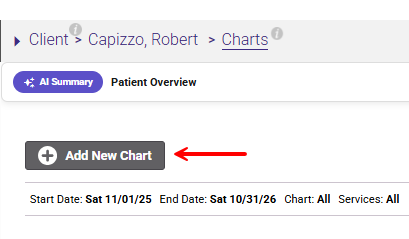
- Choose the option to upload existing documentation.
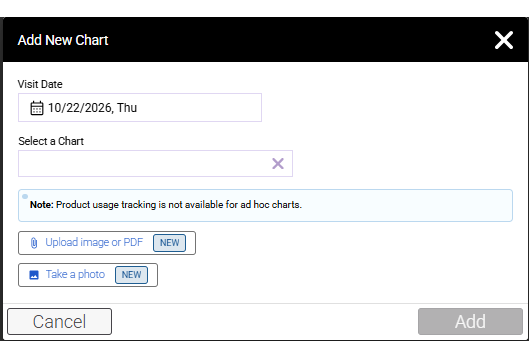
- Upload image or PDF: Add the documentation using any of the supported file types. Upload JPG, PNG, HEIC, or PDF files.
- Take a photo: Take photos using your device’s camera.
- If the record contains multiple pages, arrange them in the order they should appear.
- Enter an optional label to make the record easier to identify.
- Select the applicable visit date.
- Complete the upload. Meevo combines the pages into one read-only PDF and adds it to the client’s Charts list with an Image Upload status.