Tips for Membership and Payment Plan Forms
Important: Meevo is a HIPAA-compliant platform. If you are collecting client data, it is your responsibility to use this platform according to HIPAA regulations.
Available through the Docs and Forms Business Booster, Membership and Payment Plan forms give you an easy way to collect important client acknowledgments when a membership or Payment Plan is purchased.
With just one form, you can confirm the client’s understanding of billing and renewal terms, highlight the benefits of a new membership, and capture consent to securely store their credit card on file.
- To make setup easier, we’ve included Membership Form and Payment Plan Form templates to help you get started. Go to Docs & Forms (Meevo > Management > Docs & Forms) and select the Form Builder tab of the desired form defintion. Then select Customize a Template and select the Membership Purchase Form or Payment Plan Form.
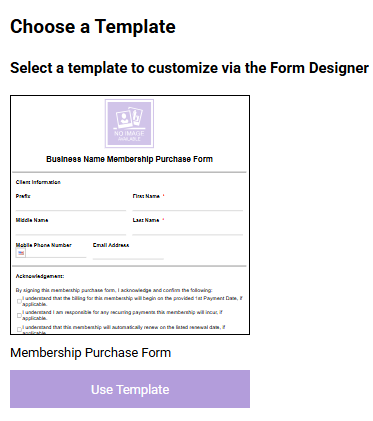
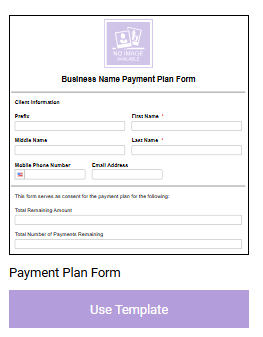
- The forms include fields for basic client information and key acknowledgment checkboxes covering billing details, recurring payments, membership renewal, and consent to store billing info.
- We highly recommend using one of these templates as a starting point and customizing it to reflect the specific details and requirements of your business.
- When customizing forms, we recommend using the new dynamic tags (outlined below) to automatically pull in specific client, membership, and payment plan details for a more personalized experience.
- Customize your templates using the Membership Information and Payment Plan Information System Tags to easily insert membership/Payment Plan-specific details.
- Membership tags are ideal for including details about the membership such as pricing, billing frequency, and renewal terms.
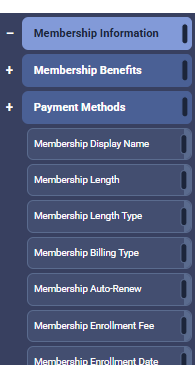
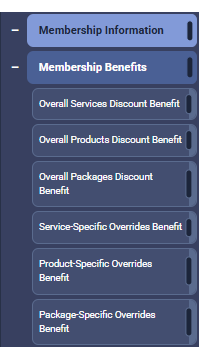
- Membership Benefits tags help highlight the value of a membership by referencing specific perks from Member Benefit Templates, such as discounts on services, products, or packages.
- Use Payment Plan tags to list specifics about the terms, such as the Total Remaining Amount, Total Number of Payments Remaining, and Payment Date of the Month.
- Membership tags are ideal for including details about the membership such as pricing, billing frequency, and renewal terms.
- Use the Today's Date tag alongside signature fields to ensure compliance and to protect your business from potential disputes. Unlike the standard "Date" Custom Form Field (CFF), this tag is not editable to ensure accurate record keeping.
- Be sure to review the default Membership Forms and Payment Plan Forms notification templates. These notifications deliver the links to the forms that clients need to complete.
Sending Membership and Payment Plan Forms
We recommend you use Meevo's Docs & Forms to create and send Membership/Payment Plan agreements to each client who purchases a membership or enters into a Payment Plan. This helps document client consent and clearly outline terms at setup.
Payment Plan and membership forms/agreements can be sent to the client before or after the transaction is completed in the register. When setting up a Payment Plan or membership in the register, you’ll have the option to send the agreement before finalizing the transaction. If it is not sent at that point, the notification is sent when the transaction is completed if your notification settings allow it.
Completion of the form is not required to be able to finalize the transaction.