About Block Types and Blocked Time
What is a Block Type?
A Block Type denotes a period in an employee’s schedule when they are temporarily unavailable, such as lunch, meetings, or training. Block Types provide a visual indicator in the Appointment Book that the employee is involved in something other than their primary task.
Since blocked time is assumed to be unavailable time, it is never considered by our Scan for Opening service, and blocked time will never appear in scan results as “available” time. Note that a user can, in Meevo, manually double-book over the Block Type in the Appointment Book, but this will always have to be a manual action.
What does a Block Type look like in the Appointment Book?
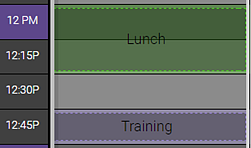
The appearance of Block Types in the Appointment Book can be customized, just like Appointment Categories. In the example below, Lunch and Training are the Block Types, each with their own individual color scheme (green and purple backgrounds, respectively).
Does an employee block require a Block Type?
Yes; any time you add an employee block to the Appointment Book, you must select a Block Type.
Can I still book an employee who is on blocked time?
Yes; if the employee allows for double-booking, you can manually double-book over blocked time. Scan for Opening will never display blocked time as available time.
Should I create Block Types for absences, such as vacation?
No, you should not use Block Types to record employee absences due to sickness or vacation. To classify and record those absences, create and apply Work Activities.
Prerequisites to creating this item: