MeevoTips Powered by Tippy
MeevoTips is an integrated tipping solution that allows your clients to add tips during checkout that are distributed directly to employees.
- Free yourself of the burden of collecting, floating, and disbursing tip funds.
- Offer customers the convenience of credit card tipping and reduce processing fees.
- Providers enjoy instant access to their tips via a debit card or digital wallet.
- Give employees access to their tipping information and more through the mobile app.
Meevo offers two solutions that provide employees instant access to their tips: MeevoTips Powered by Tippy (our integrated solution), and Stand Alone MeevoTips (a side-by-side setup that functions outside of Meevo).
How are MeevoTips and Stand Alone MeevoTips different?
Both MeevoTips and Stand Alone help your business collect and distribute tips electronically, but they differ in how they work with Meevo and the client tipping experience during checkout.
- MeevoTips is our fully integrated tipping solution, allowing clients to add tips during checkout without requiring a separate payment (swipe) for the tip.
- Stand Alone MeevoTips is an option that operates independently from Meevo, requiring a separate card swipe to fund tips.
Read on for more key differences between the two solutions:
| Integrated MeevoTips | Stand Alone MeevoTips | |
|---|---|---|
| Swipes | One Swipe Clients interact with the Kiosk to allocate tips, but the rest, including payment, is handled through Meevo as a single-swipe client experience. |
Two Swipes On the Kiosk step, when the client enters a tip amount, they will swipe their card to fund that tip. This is a separate swipe from the remaining balance on the transaction. |
| Cost | As a Meevo customer your only cost for MeevoTips is at sign-up for shipping and handling to have your Kiosk shipped to your business. Your FREE annual subscription includes hardware, software, support, a full dashboard, TippyGo, and Instant Tips. | As a Meevo customer your only cost for MeevoTips is at sign-up for shipping and handling to have your Kiosk shipped to your business. Your FREE annual subscription includes hardware, software, support, a full dashboard, TippyGo, and Instant Tips. |
| Fees |
Each client is charged $0.60 + 2.75% per transaction for the Tip Convenience Fee. MeevoTips helps you reinvest in your business with a *Must activate within 30 days upon receipt, not valid with any other offers or promotions, new customers only. |
Each client is charged $0.60 + 2.75% per transaction for the Tip Convenience Fee. |
| Funds | Each service provider using MeevoTips is required to have their own Branch account. | Each service provider is required to have their own Branch account. Tips are sent directly to the Branch account by the next business day. |
| Reporting | Tips are included in Meevo reporting and are available alongside transaction data. Tip Convenience Fees also appear in applicable Meevo reports. | Reporting is managed entirely through the Tippy Dashboard. Tips are not associated with Meevo transactions and are not included in Meevo reports. |
How do I switch from a stand-alone solution to integrated MeevoTips?
If you signed up with the original Stand Alone MeevoTips solution but you want to get started with integrated MeevoTips, reach out to your Account Manager at Tippy or email support@meettippy.com to assist with your upgrade.
If you are signing up with MeevoTips for the first time, see below for how to get started.
Single Locations
Head over to Meevo > MeevoXchange:
- Enable the MeevoTips tile to get things started; you'll be directed to Tippy to create your account and get your employees signed up. You'll want to get started working with Tippy first so that you can get your kiosk shipped out.
- You can also reach out to our MeevoTips Specialist at alexa@meettippy.com to get a new account set up.
Multi-Locations
To get started, please reach out to your Client Success Manager (CSM) directly or email us at clientsuccess@meevo.com.
How do I set up integrated MeevoTips?
Once your MeevoTips integration has been added to Meevo, a member of our team will contact you to schedule a setup call. During the call, we'll guide you through the setup process and help ensure MeevoTips is configured correctly and ready to use.
For details on the setup process, see Setting Up MeevoTips.
How do I set up the standalone solution?
A member of our team will contact you to schedule a setup call and guide you through the process. Because the standalone solution operates independently from Meevo, setup is done directly within the Tippy platform.
Refer to the following Tippy Help Center Getting Started articles for detailed instructions:
- Set up the stand-alone Tippy Kiosk. Complete the kiosk setup and pair the Adyen EMV reader.
- Complete a test transaction: To verify the setup is working correctly, create a $1 ticket and process payment using a contactless or chip card.
What is TippyGo?
TippyGo is a mobile tipping solution that allows clients to leave tips without using a physical Kiosk. While most tips are collected at the Kiosk during checkout, there are times when that's not practical (for example, when services are performed off-site, during mobile appointments, or while away from the front desk). TippyGo provides an alternative tipping experience for those situations.
Each staff member receives a unique QR code or digital link that clients can use to leave a tip from their mobile device. A typical TippyGo experience looks like this:
- The employee shares their TippyGo QR code or digital link with the client. This employee could be a stylist working an off-site event, a massage therapist providing mobile services, or a front desk employee assisting a client away from the register.
- The client scans the QR code or opens the link on their mobile device.
- While on their mobile device, the client selects a tip amount and completes payment.
- The tip is processed and deposited into the provider's account.
Important for MeevoTips users: Tips processed through TippyGo are not integrated with Meevo and do not appear on Meevo reports. To report on TippyGo tips, run the Tippy Payroll Report from the Tippy Dashboard.
Are all Payment Types accepted when using integrated MeevoTips?
With integrated MeevoTips:
- Transactions that include MeevoTips cannot be paid using Self-Pay.
- Gift Cards can be used to pay for MeevoTips as long as the Allow gift card to be redeemed towards tips option is enabled in Meevo Business Preferences.
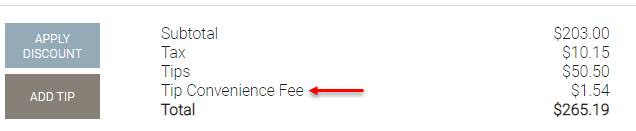
What is a Tip Convenience Fee?
The Tip Convenience Fee helps support the electronic processing involved with giving employees' instant access to their earned tips.
The fee is calculated based on the total tip amount applied through the kiosk.
Note: Tips collected through service charges (Employee Tips) and prepaid tips on package redemptions are not provided to the employee and must be distributed by your business separately.
How do I report on the Tip Convenience Fee?
The Tip Convenience Fee appears in the following Meevo reports:
- MR080 Register Summary: Listed as a line item under Tip Collected in the Drawer Maintenance section.
- MR085 Sales Detail: Listed as a line item in the Fees section.
- MR100 Transaction Log: Listed under Tips in the Totals section.
- If you are using one of our QuickBooks integrations, the Tip Convenience Fee appears in the Fees Collected sub-account of Meevo Other Income.
Note: Tips processed through TippyGo are not integrated with Meevo and do not appear on Meevo reports. To report on TippyGo tips, run the Tippy Payroll Report from the Tippy Dashboard.